Apple Music Downloader
Download Apple Music to MP3 For Free
Apple Music Downloader - Download Songs, Albums, and Playlists from Apple Music!
Looking to download your favorite songs, albums, and playlists from Apple Music? Our Apple Music Downloader is just what you need!
APLMate is an online tool that allows you to download any song, album, or playlist from Apple Music. What's more, it's totally free and simple to use!
All you need to do is copy the URL of the Apple Music song, album, or playlist, paste it into our Apple Music downloader, and it'll start doing its thing for you.
Once it's done, you can save the music directly to your computer or mobile device, letting you listen anytime, even without an internet connection. Try it out today and have your favorite music ready to play whenever you like!
What is Apple Music Downloader?
APLMate is a free online tool to help you convert Apple Music songs to MP3 format. Enjoy your Apple Music favorites with the highest quality in an MP3 file. Our Apple Music Downloader is 100% free to use, quick, and secure. Just copy the Apple Music Track, Playlist, Album link. Simply paste it into the input field on the APLMate Apple Music Downloader website, and you're all set to download your music in MP3 format.
Features - Save Apple Music songs to mp3:
- Downloads Apple Music songs.
- Downloads Apple Music albums.
- Downloads Apple Music playlists.
- Easy to Use, Fast and always free.
- Downloads as 320kbps MP3.
- Fastest Apple Music downloader!
- Compatible across all browsers and devices, including phones, computers, and tablets.
- No need to install anything!
How to use Apple music Downloader?
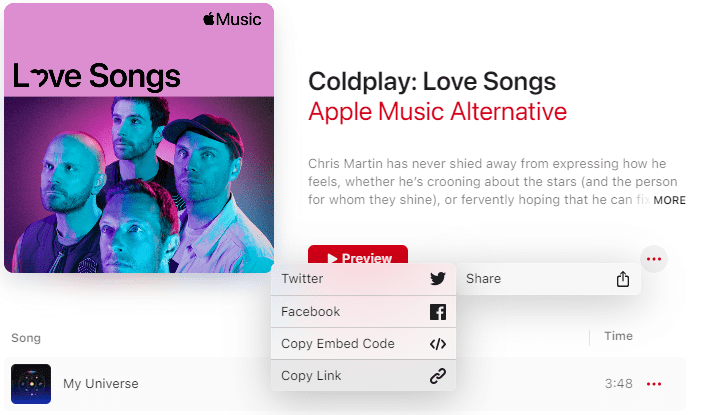
- Open the Apple Music App, or the Apple Music website in your browser.
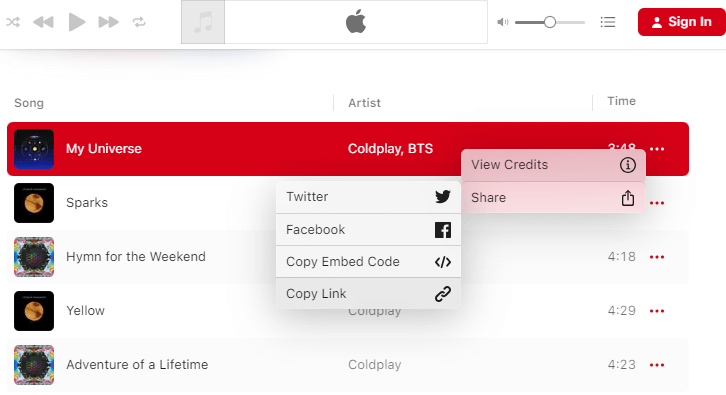
- Open the Album or Playlist and select the song you want to save in Mp3.
- Click the and click button.
- Select .
- Visit the website APLMate.com Apple Music Downloader to MP3.
- Paste the Link above.
- Click the Download button and wait for the APLMate to process.
- Select Mp3 quality to download Apple music in Mp3.
Best features of Apple Music Downloader
Some of the Best features of Apple Music Downloader include:
Fastest Downloads: APLMate Apple music downloader lets you quickly download your favorite Apple Music songs. No waiting around!
Download Anything: Save full playlists or albums with a single click. No limits on how many songs you can download.
High-Quality MP3s: Get your music in MP3 format, perfect for playing on any device like your phone, computer, or iPhone/iPod.
Simple and Free: No need for apps or payment. APLMate Downloader is easy to use and totally free.
No Annoying Ads: Enjoy a clean, ad-free experience as you download your music.
Keeps Song Details: All downloads come with song info, like artist and album, so your music stays organized.
Final Thoughts on Apple Music Downloader
There are many reasons why you might want to download a song from Apple Music. Maybe your internet connection isn't always reliable for streaming music. Or you could have an old music player that doesn't work with Apple Music. You might even want to put your favorite songs on CDs or DVDs. Whatever your reason, APLMate is the perfect solution. It's an easy-to-use tool that lets anyone download any Apple Music track quickly. You can get your music in seconds, right from home.
This is a quick look at Apple Music Downloader, a simple but powerful tool for downloading any Apple Music song as an MP3. Keep enjoying your downloads with APLMate and thanks for your support!